Example:
In custom list we have field “Comments” and it’s type is Multi Line Text with Version and selected ”Allow append text” as option, now if we want to check all Versioned Comments /History of comments with entered text, date and time and person name then if we try to access it’s field value programmatically by list item then it will always returns latest version.
Below code will explain and demonstrate how we can take version of multiline text values with username, date and time.
public static string GetVersionedMultiLineTextAsPlainText(SPListItem item, string key)
{
StringBuilder sb = new StringBuilder();
foreach (SPListItemVersion version in item.Web.Lists[item.ParentList.ID].Items[item.UniqueId].Versions)
{
SPFieldMultiLineText field = version.Fields[key] as SPFieldMultiLineText;
if (field != null)
{
string comment = field.GetFieldValueAsText(version[key]);
if (comment != null && comment.Trim() != string.Empty)
{
sb.Append("");
sb.Append(version.CreatedBy.User.Name).Append(" (");
sb.Append(version.Created.ToString("MM/dd/yyyy hh:mm tt"));
sb.Append(") ");
sb.Append(comment);
}
}
}
return sb.ToString();
}
Showing posts with label Sharepoint Multiple Line. Show all posts
Showing posts with label Sharepoint Multiple Line. Show all posts
Wednesday, June 17, 2009


Friday, June 12, 2009
How to set version history of multiline into SharePoint list
Hello friends
When we need to maintain comments history in sharepoint list for every item , like comment description, User name and date and time of comments entered, what we need to do is , add one custom field in your list as “Comments “(or you can use any User Friendly field Name) and make its type as “Multi Line of Text” and make sure you select “Append changes to Existing Text”
List its versioning Settings must be set.
Now this will show you result of that Comments
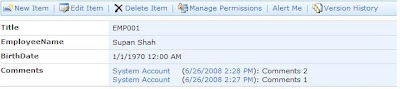
So here may be same user or different user can add their comments and it display like User Name, Date-time of entered comment, and Comment Description in the same list item.
When we need to maintain comments history in sharepoint list for every item , like comment description, User name and date and time of comments entered, what we need to do is , add one custom field in your list as “Comments “(or you can use any User Friendly field Name) and make its type as “Multi Line of Text” and make sure you select “Append changes to Existing Text”
List its versioning Settings must be set.
Now this will show you result of that Comments
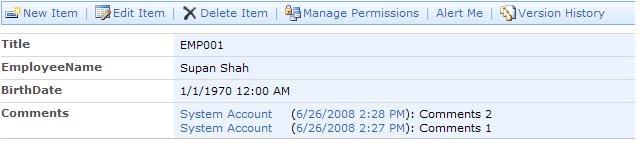
So here may be same user or different user can add their comments and it display like User Name, Date-time of entered comment, and Comment Description in the same list item.
Subscribe to:
Posts (Atom)